Table of content

Use this Ellipse Area Calculator to instantly calculate the area by entering the semi-major and semi-minor axes.
Simply input the semi-major axis (a) and the semi-minor axis (b), click calculate, and get the exact area in square units within seconds. The tool applies the standard formula automatically, so you don’t need to multiply or round anything manually.
Using the Ellipse Area Calculator only takes a few seconds. You just need the correct radius values, and the tool will handle the formula automatically.
The semi-major radius is half of the longest diameter of the ellipse. Enter this value into the first input field. Make sure you are using a consistent unit such as meters, feet, inches, or centimeters.
Next, enter the semi-minor radius, which is half of the shortest diameter of the ellipse. This value must use the same unit as the semi-major radius to ensure the result is correct.
If the calculator provides a unit selection option, choose your preferred measurement unit. The final area will be displayed in square units based on your selection.
After entering both values, click the “Calculate” button. The calculator instantly applies the formula A = π × a × b and computes the total area.
The result will appear immediately below the input fields. The area is shown in square units, such as m² or ft², depending on your inputs.
Always double-check that both radius values are entered correctly and in the same unit before calculating. Even a small input mistake can change the final area.
Once your values are entered correctly, the Ellipse Area Calculator provides an accurate result instantly, saving you time and avoiding manual calculation errors.
The tool applies the formula A = π × a × b automatically once you enter the semi-major and semi-minor radii. It eliminates manual multiplication and instantly returns the correct area in square units.
With this calculator, you can:
Calculate ellipse area using semi-major radius (a) and semi-minor radius (b)
Get results in square meters (m²), square feet (ft²), square inches (in²), or other square units
Measure both horizontal and vertical ellipses
Calculate small geometric figures or large-scale layouts
Use it for academic, construction, or design purposes
Whether you’re solving a geometry problem or estimating the size of an oval-shaped space, this calculator handles the math in seconds and delivers a precise result.
.jpg)
When you enter the semi-major and semi-minor radii, the calculator computes A = π × a × b and returns the area in square units. The unit of the result depends entirely on the unit you used for the inputs. If your radii are entered in meters, the result will be displayed in square meters (m²). If they are in feet, the output will be in square feet (ft²), and so on.
This value tells you how much flat space is contained inside the oval shape. It does not measure perimeter or edge length — only the total surface covered within the ellipse.
To get the area of an ellipse, you only need two numbers: the semi-major axis and the semi-minor axis. Think of them as the “half-lengths” of the ellipse in its long direction and short direction.
a = semi-major axis (half of the longest width)
b = semi-minor axis (half of the shortest width)
Once you have a and b, the ellipse area formula is: A = π × a × b
That’s it. No extra steps, no tricky geometry. Multiply a and b, then multiply by π (pi).
⚠️ A quick note: if a and b are measured in meters (m), your answer will be in square meters (m²). If they're centimeters (cm), the result will be cm², and so on. The key is to keep both axes in the same unit before you calculate.
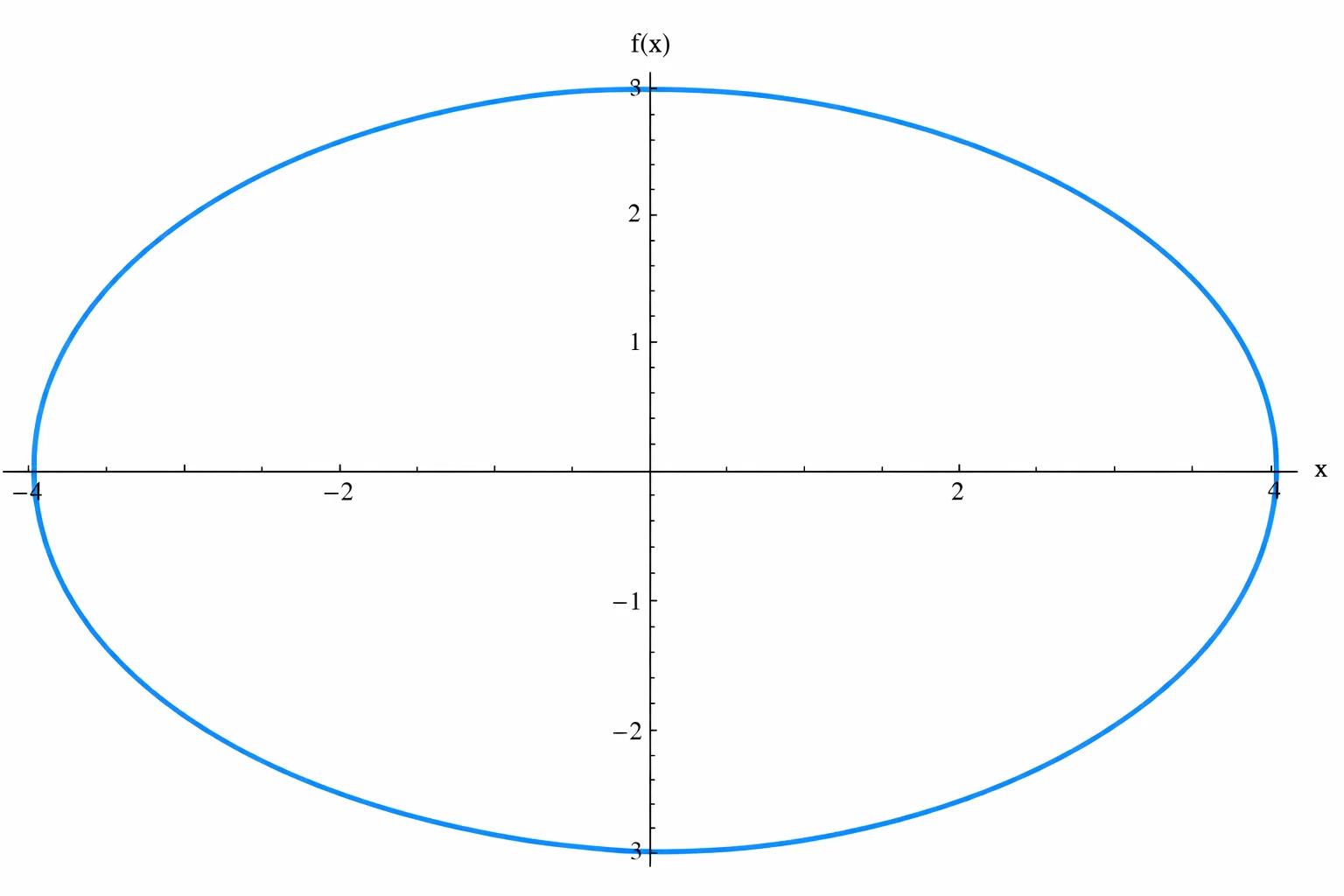
An ellipse has two different radii because it stretches longer in one direction than the other. The semi-major radius (a) is half of the longest diameter of the ellipse. This is the distance from the center to the farthest edge along the longest axis.
The semi-minor radius (b) is half of the shortest diameter. It measures the distance from the center to the edge along the shorter axis.
If you already know the full length and full width of the ellipse, simply divide each by 2. For example, if the total length is 10 feet and the total width is 6 feet, then:a = 10 ÷ 2 = 5b = 6 ÷ 2 = 3
These are the values you would enter into the calculator.
Make sure both radius values use the same measurement unit before calculating. Mixing feet and meters, for example, will lead to incorrect results.
Yes. The calculator is completely free and available online without registration.
You only need to enter the lengths of the semi-major axis and the semi-minor axis. Once entered, the calculator instantly computes the area.
This tool is suitable for students, teachers, engineers, designers, and anyone who needs a quick and accurate ellipse area calculation.
Yes, but you must divide the diameter by 2 first to get the semi-major and semi-minor radii before entering them.
Ellipseareacalculator.com was built to deliver fast, accurate, and hassle-free ellipse area calculations in just a few clicks. We focus on removing the friction from math by turning formulas into practical, easy-to-use tools.
Our approach is simple: clarity first. Every calculation is powered by proven mathematical principles, wrapped in an interface that’s intuitive for students, professionals, and anyone who needs reliable results without distractions. No sign-ups, no unnecessary steps—just straightforward math that works.
We’re continuously refining our tools to ensure they stay accurate, efficient, and accessible for everyone.
Our editorial team consists of editors and contributors from various health and fitness–related fields, who compile and verify information using reliable and official sources.
We are committed to providing a safe, transparent, and user-friendly experience for everyone who uses Ellipseareacalculator.com.
All calculations are based on standard mathematical formulas and are designed to deliver precise results. While we strive for accuracy at all times, our tools are intended for educational and general informational purposes and should not replace professional judgment where specialized accuracy is required.
We respect your privacy. Ellipseareacalculator.com does not require account registration, and we do not collect personal information through calculator inputs. Any data entered is used solely to perform calculations and is not stored or shared.
Our tools are free to use for personal, educational, and non-commercial purposes. We ask users to use the calculator responsibly and not attempt to disrupt, misuse, or exploit the service.
We reserve the right to update, modify, or improve the calculator and its features at any time to enhance performance, accuracy, and usability.
By using this tool, you agree to these policies and acknowledge your responsibility for how the results are applied.